最近 MiniMax 開源了他們最新的影片生成模型——MiniMax H3(部分社群亦稱為 Hailuo 3.0)。
這款開源模型最大的亮點,在於它與先前熱門的 LTX 2.3 一樣,生成輸出的結果直接包含影像與同步音訊(影音一體直出)。除了支援基本的文字提示詞輸入、首尾幀參考圖片外,甚至還能夠參考音訊檔案,並且支援生成長度 4 到 15 秒、解析度高達 2K 的影片內容。
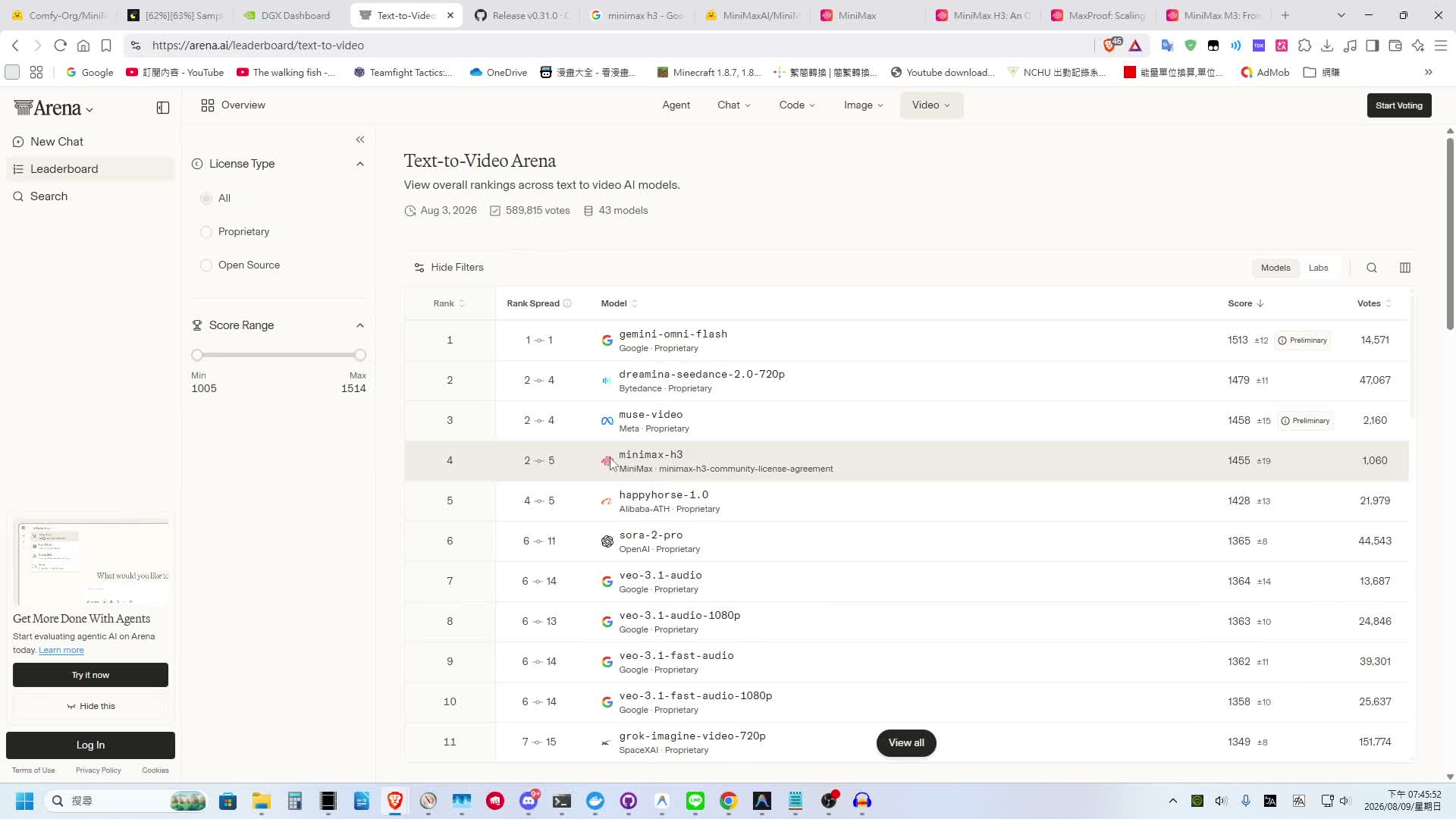
在 LM Arena 的人工智慧影片生成排行榜中,MiniMax H3 在文生影片 (Text-to-Video) 排行榜中位居全網第四名,而在圖生影片 (Image-to-Video) 排行榜更是高居第二名,實力相當強悍。
當然,這類大型影片模型的生成速度與所需的顯示卡 VRAM 資源,可能不是非常美麗。剛好我手上有一台 ASUS Ascent GX10(華碩推出的桌面型 AI 超級電腦,基於 NVIDIA DGX Spark 架構),今天就帶大家實際測試 MiniMax H3 的生成效果,並分享如何在 ComfyUI 中快速上手與優化生成速度。
MiniMax H3 技術架構與規格解析
在開始實測前,先來了解 MiniMax 官方發布文章與 Hugging Face Model Card 中揭露的核心技術規格與輸入輸出格式:
MiniMax H3 採用了全模態單流 Transformer 架構:
| 技術項目 |
規格細節說明 |
| 模型架構 |
H3-Omni-Transformer(單流全模態 Dense Transformer) |
| 核心參數量 |
33B(330 億參數) |
| AdaLN 調變層 |
約 13B 屬於 AdaLN 分支,推理時可預先計算並快取,有助於降低顯存資源開銷 |
| 文字編碼器 |
整合 Qwen3-VL-32B(擷取第 50 層隱藏狀態特徵) |
| 位置編碼 |
3D 多模態旋轉位置編碼(MM-RoPE,同時編碼時間 t、高度 h、寬度 w) |
| 影音編碼器 |
專利 H3-VAE 影音高比例壓縮 Tokenizer(帶來約 4 倍有效序列長度增益) |
與傳統將圖像與音訊拆分成不同模態模型各自處理的 Pipeline 不同,MiniMax H3 將文字、圖像、視訊與音訊直接打散為統一序列(Packed Sequence),在同一個 Self-Attention 與 FFN 網路中同步進行去噪運算,真正做到影音原生結合。
2. 兩大核心任務權重 (FL2VA vs Ref2VA)
根據不同的應用場景,官方將模型分為兩種主要 Denoiser Checkpoints:
FL2VA (First/Last Frame to Video & Audio):
- 適用情境:純文字生成影片 (T2V) 或單一首幀、首尾幀參考圖片 (I2V / First-Last Frame)。
- 參考限制:支援 0 到 2 張參考圖片。
Ref2VA (Reference to Video & Audio):
- 適用情境:全模態多參考生成 (Omni-Reference),適用於角色一致性、風格遷移、語音對白與口型同步。
- 參考限制:單次生成最多可混合參考 12 個多媒體檔案(上限包含最多 9 張圖片、3 段影片與 3 段音訊)。
3. 生成與輸出規格對照
- 影片時長與幀率:支援 4 至 15 秒 影片生成,預設輸出為 24 FPS。
- 原生雙聲道音訊:音訊與畫面同時產生,原生提供 32 kHz 立體聲,包含人聲對白、背景音樂與環境音效。
- 生成解析度:本機運算基準預設為 768p(短邊);亦可透過 In-Context Regenerate-2K 二階段重構流程達到 2K 畫質。
實測一:文生影片
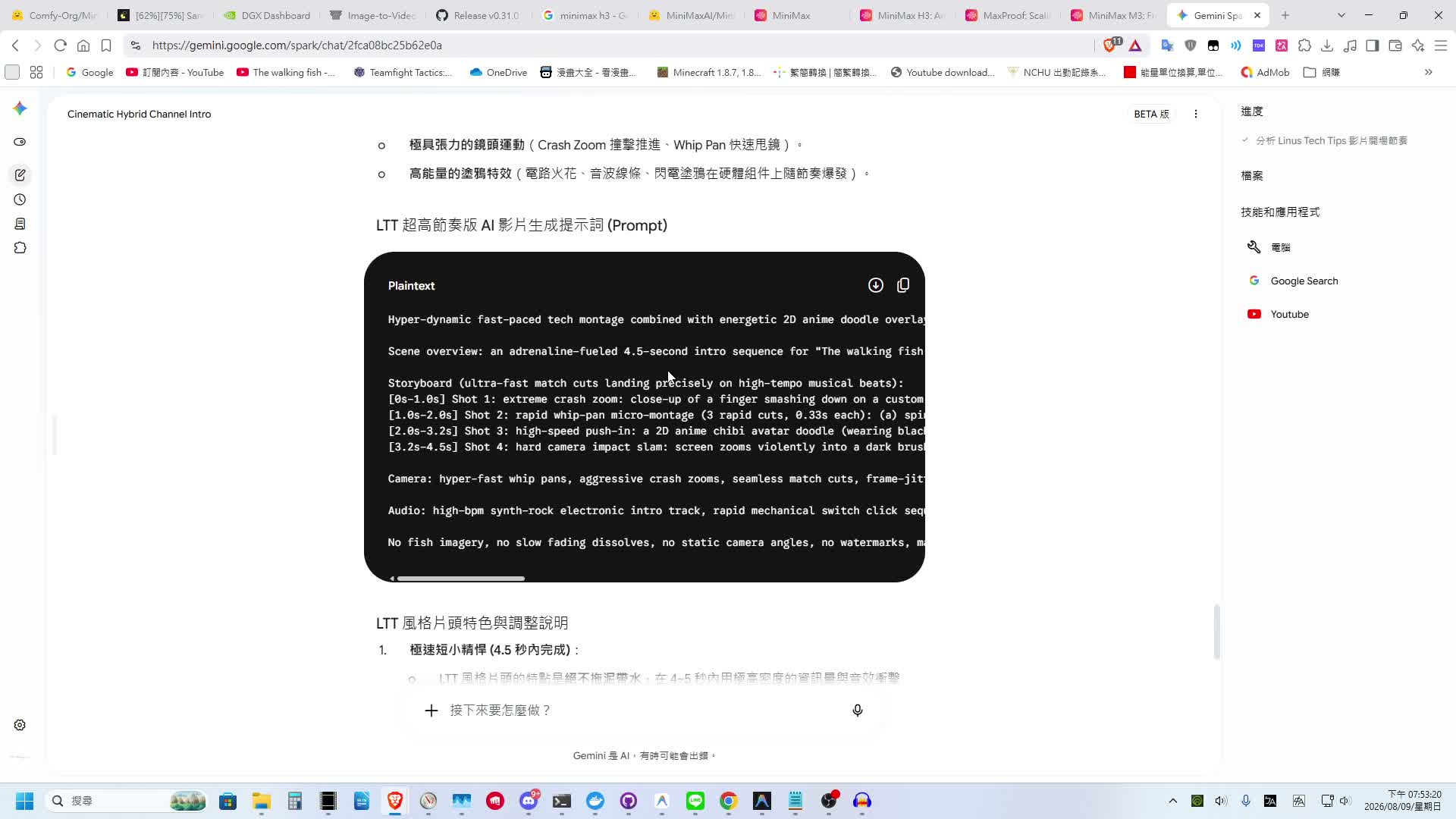
首先測試純文字輸入生成影片的效果。這裡我試圖讓模型生成一部「步行魚頻道介紹影片」,並先透過 Gemini 協助構建詳細的提示詞描述。
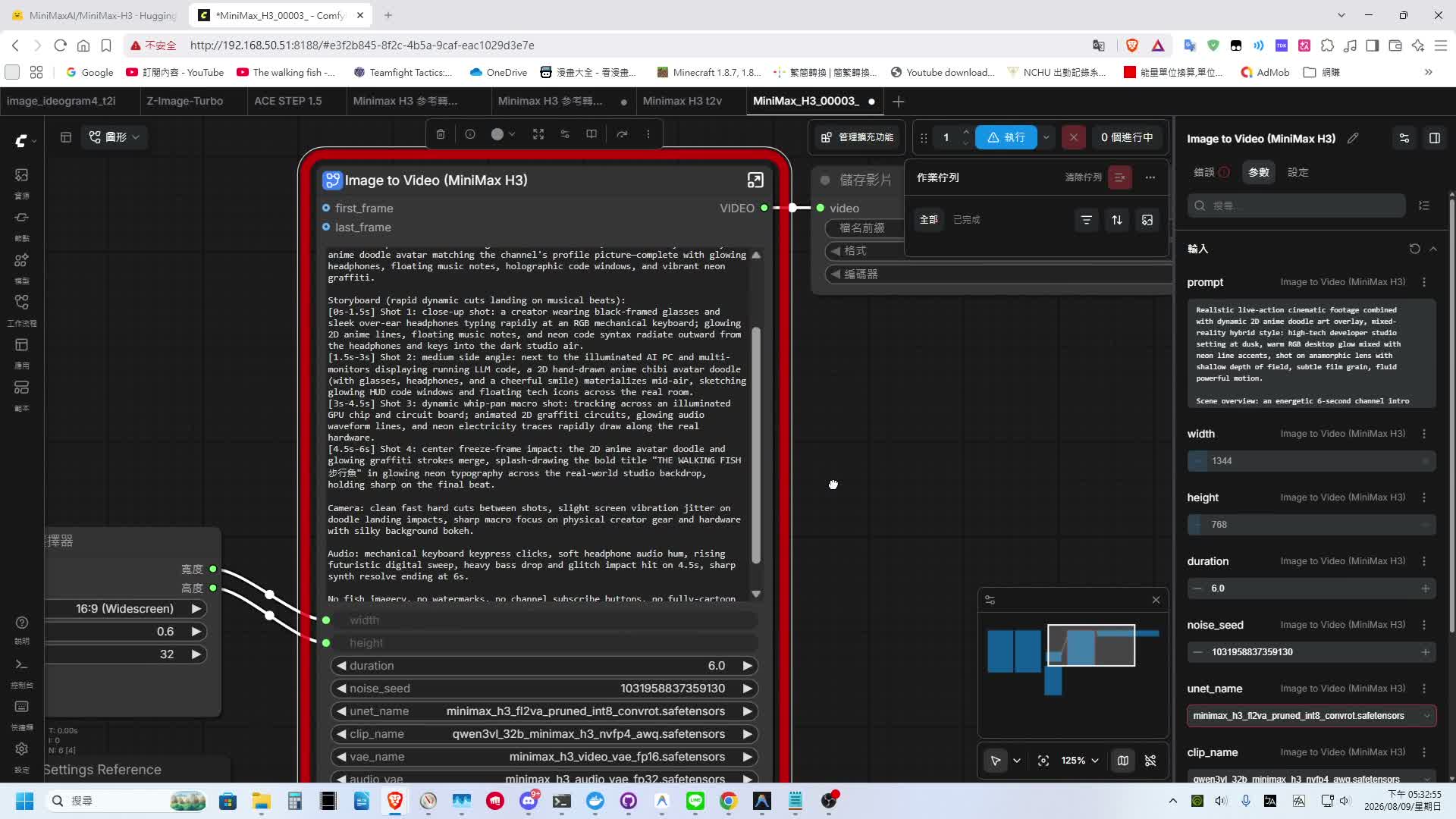
在參數設定上:
- 生成時長:6 秒
- 解析度:選擇 0.6 百萬像素(對應解析度為
1056x608)
從生成結果來看,畫面整體的流暢度與光影細節表現都相當不錯。
以下為 MiniMax H3 純文字產出的完整 6 秒動態與音效影片:
不過因為這個純文字版本完全沒有提供任何參考圖片,模型無法得知我的頻道頭像與視覺特徵,因此產出的頭像角色與實際頻道視覺有所出入。
提示詞:
 1
 2
 3
 4
 5
 6
 7
 8
 9
10
11
12
13
14
15
|
Realistic live-action cinematic footage combined with dynamic 2D anime doodle art overlay, mixed-reality hybrid style: high-tech developer studio setting at dusk, warm RGB desktop glow mixed with neon line accents, shot on anamorphic lens with shallow depth of field, subtle film grain, fluid powerful motion.

Scene overview: an energetic 6-second channel intro for "The walking fish 步行魚" YouTube channel. A real-world creator with black-rimmed glasses and over-ear studio headphones sits at a high-tech AI workstation, surrounded by a lively 2D anime doodle avatar matching the channel's profile picture—complete with glowing headphones, floating music notes, holographic code windows, and vibrant neon graffiti.

Storyboard (rapid dynamic cuts landing on musical beats):
[0s-1.5s] Shot 1: close-up shot: a creator wearing black-framed glasses and sleek over-ear headphones typing rapidly at an RGB mechanical keyboard; glowing 2D anime lines, floating music notes, and neon code syntax radiate outward from the headphones and keys into the dark studio air.
[1.5s-3s] Shot 2: medium side angle: next to the illuminated AI PC and multi-monitors displaying running LLM code, a 2D hand-drawn anime chibi avatar doodle (with glasses, headphones, and a cheerful smile) materializes mid-air, sketching glowing HUD code windows and floating tech icons across the real room.
[3s-4.5s] Shot 3: dynamic whip-pan macro shot: tracking across an illuminated GPU chip and circuit board; animated 2D graffiti circuits, glowing audio waveform lines, and neon electricity traces rapidly draw along the real hardware.
[4.5s-6s] Shot 4: center freeze-frame impact: the 2D anime avatar doodle and glowing graffiti strokes merge, splash-drawing the bold title "THE WALKING FISH 步行魚" in glowing neon typography across the real-world studio backdrop, holding sharp on the final beat.

Camera: clean fast hard cuts between shots, slight screen vibration jitter on doodle landing impacts, sharp macro focus on physical creator gear and hardware with silky background bokeh.

Audio: mechanical keyboard keypress clicks, soft headphone audio hum, rising futuristic digital sweep, heavy bass drop and glitch impact hit on 4.5s, sharp synth resolve ending at 6s.

No fish imagery, no watermarks, no channel subscribe buttons, no fully-cartoon background, preserve high-contrast photo-realistic physical hardware and human textures underneath the vibrant 2D anime stroke art.
|
實測二:參考圖生影片——頻道宣傳短片
為了讓模型精確還原頻道視覺,接下來測試加入參考圖片的版本。我提供了包含頻道頭像以及 YouTube 頻道首頁截圖的參考圖片,讓 MiniMax H3 生成一段宣傳短片。
由於 MiniMax 屬於中國開發團隊發布的模型,理論上對中文語意的理解與中文配音生成支援度會更好。因此在提示詞中,我特別加入了中文對話台詞:
「每一集都是一次深度實測,AI 新知、實測開箱通通不錯過!步行魚頻道訂閱起來,一起追上 AI 浪潮!」
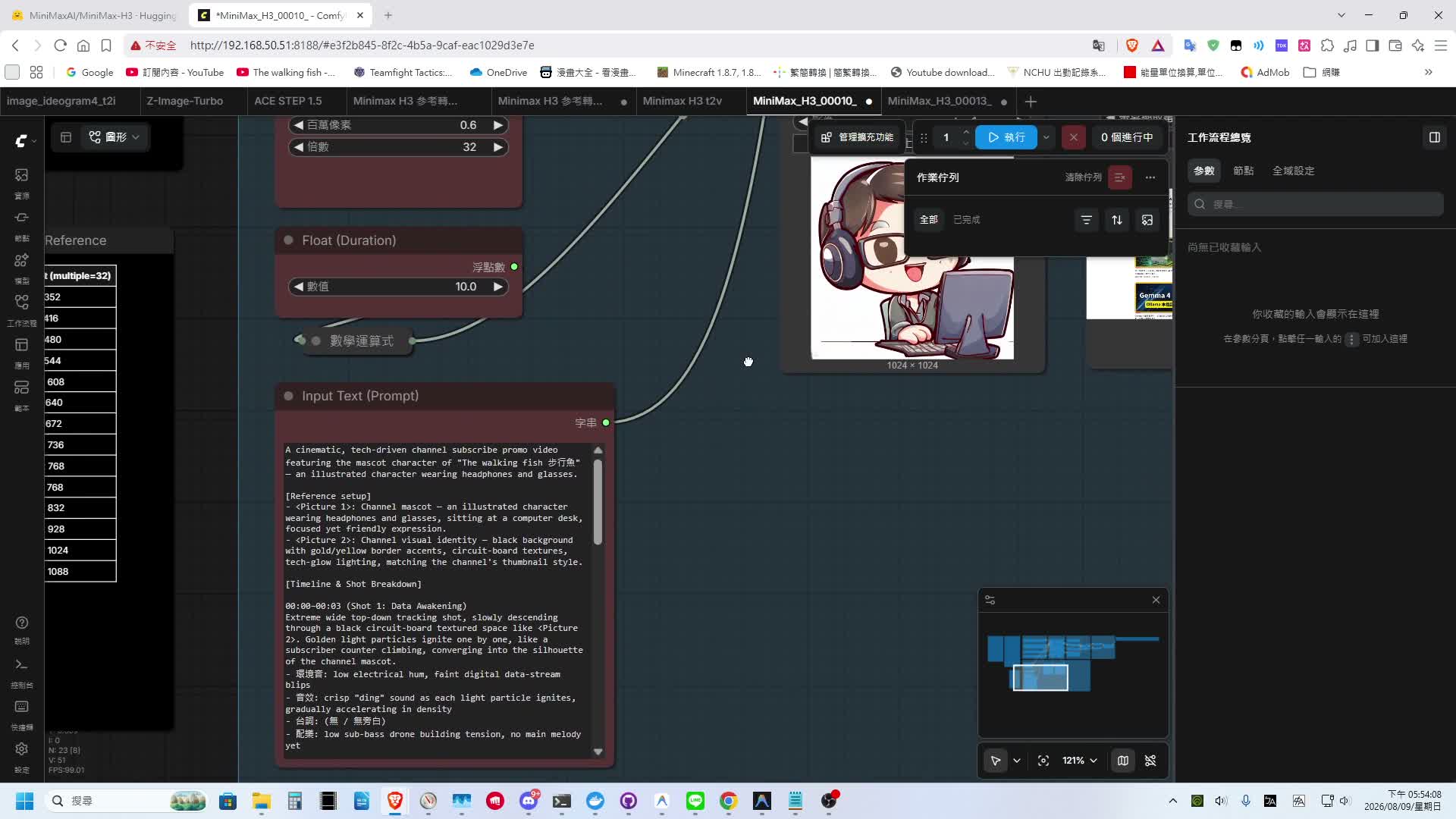
以下為圖生影片實測的完整動態影片:
畫面中的角色完美還原,在畫面上,我頻道的頭像與 YouTube 截圖中的影片縮圖元素,都被成功融入到了背景與視覺物件中。雖然按暫停仔細檢視時,背景文字渲染依然存在傳統擴散模型常見的文字亂碼現象,但整體動態與視覺還原度已經相當成熟。
提示詞:
 1
 2
 3
 4
 5
 6
 7
 8
 9
10
11
12
13
14
15
16
17
18
19
20
21
22
23
24
25
26
27
28
29
30
31
32
33
34
35
36
37
38
39
40
41
42
43
|
A cinematic, tech-driven channel subscribe promo video featuring the mascot character of "The walking fish 步行魚" — an illustrated character wearing headphones and glasses.

[Reference setup]
- <Picture 1>: Channel mascot — an illustrated character wearing headphones and glasses, sitting at a computer desk, focused yet friendly expression.
- <Picture 2>: Channel visual identity — black background with gold/yellow border accents, circuit-board textures, tech-glow lighting, matching the channel's thumbnail style.

[Timeline & Shot Breakdown]

00:00–00:03 (Shot 1: Data Awakening)
Extreme wide top-down tracking shot, slowly descending through a black circuit-board textured space like <Picture 2>. Golden light particles ignite one by one, like a subscriber counter climbing, converging into the silhouette of the channel mascot.
- 環境音: low electrical hum, faint digital data-stream blips
- 音效: crisp "ding" sound as each light particle ignites, gradually accelerating in density
- 台詞: (無 / 無旁白)
- 配樂: low sub-bass drone building tension, no main melody yet

00:03–00:06 (Shot 2: Character Reveal)
Fast dolly-in push. The mascot character, styled exactly like <Picture 1>, turns to face camera; glasses reflect glowing code and AI chart overlays. A gold-bordered frame like the channel's thumbnails materializes in the background.
- 環境音: residual keyboard-typing echo, faint headphone-wire micro-vibration
- 音效: sharp "swipe" scan sound as the frame materializes
- 台詞(旁白,台灣國語,男聲,沉穩中帶活力): 「每一集,都是一次深度實測。」
  → 說話時間:從 00:03 開始,於 00:05.5 前說完,語速對齊 3 秒鏡頭長度,不可被切鏡打斷
- 配樂: electronic synth main melody enters, tempo building upward

00:06–00:08 (Shot 3: Content Burst)
360-degree orbit shot around the character. Fragments of the channel's signature footage — AI hardware close-ups, chatbot UI, streaming code — flash past in the background, scattering then reassembling inside the gold frame.
- 環境音: whooshing air displacement as footage fragments cut past
- 音效: layered "whoosh" swipes synced to rising drum hits on each fragment cut
- 台詞(旁白,語速加快、更具張力): 「AI 新知、實測開箱,通通不錯過!」
  → 說話時間:從 00:06 開始,於 00:07.8 前說完,需卡在鏡頭旋轉的高潮點
- 配樂: main melody builds to peak, drum hits stacking densely

00:08–00:10 (Shot 4: Subscribe Button Reveal & Call to Action)
Camera pulls back to a static hero frame. The mascot gestures an inviting wave toward camera as a red "Subscribe" button and the "The walking fish 步行魚" logo materialize center-frame, surrounded by gold particle bursts like fireworks.
- 環境音: soft particle-scatter rustle
- 音效: deep, resonant "thud" as the button appears, synced to the music's downbeat
- 台詞(旁白,收尾語氣,帶邀請感): 「步行魚頻道,訂閱起來,一起追上 AI 浪潮!」
  → 說話時間:從 00:08 開始,於 00:09.5 前說完,最後 0.5 秒留白給音樂結尾
- 配樂: main melody resolves into a bright, punchy final synth chord, landing exactly at 00:10

[Global sound notes]
- The entire video is generated in native synchronized stereo; sound effects, dialogue, and music must dynamically yield to one another — background music auto-ducks by roughly 30% whenever dialogue is present, to avoid masking the voiceover.
- All dialogue is Traditional Chinese (Taiwanese accent) male voiceover, spoken at a brisk but clearly articulated pace; the closing line should carry a warm, trustworthy invitation tone rather than an overly hard-sell delivery.
- The overall color grade stays black-and-gold tech aesthetic throughout, matching the channel's thumbnail style and mascot design to reinforce brand recognition.
|
實測三:多圖參考短劇——阿嬤修神手修故障電視
為了挑戰更複雜的分鏡與角色連續性,我設計了一個包含 3 張參考圖片的懷舊小短劇,主題是「傳統老電視故障,阿嬤拍兩下就搞定」的生活情境。
提供給模型的 3 張角色與老電視場景參考圖片:
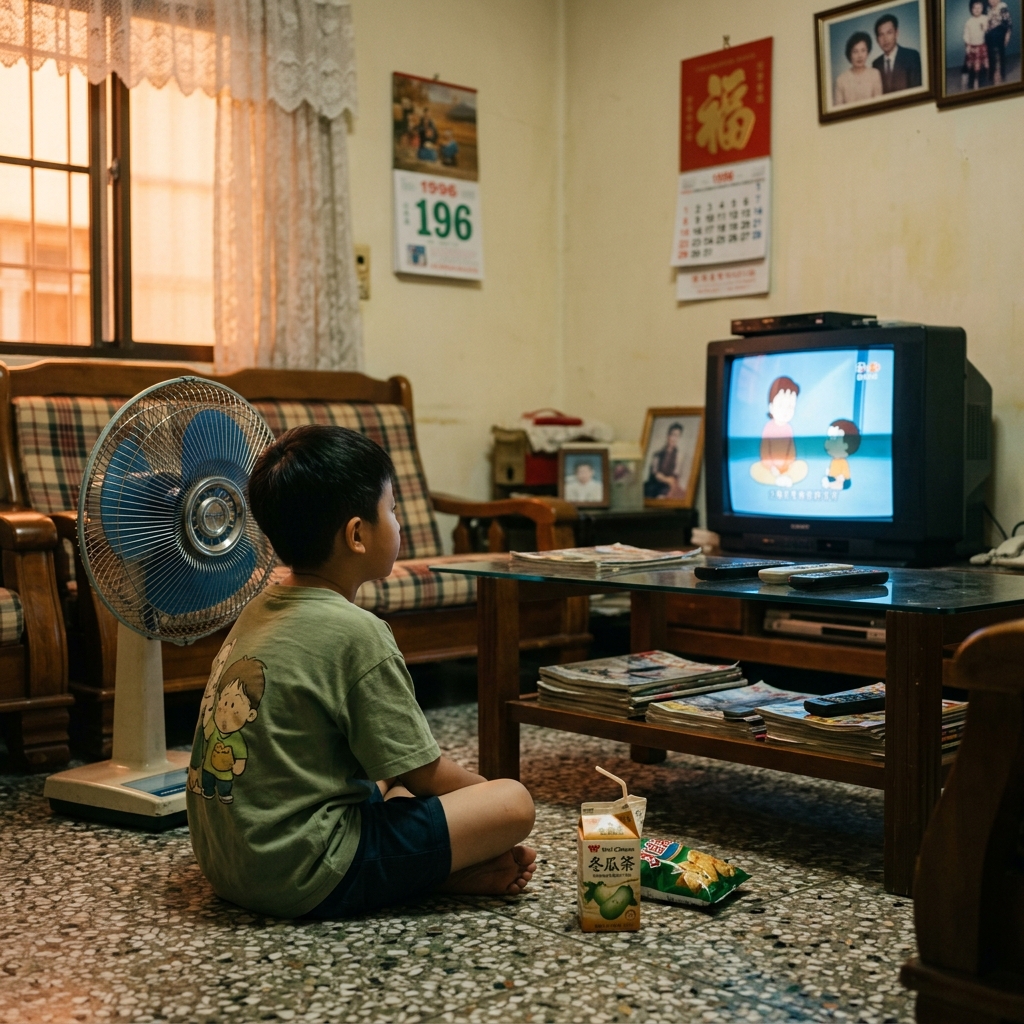
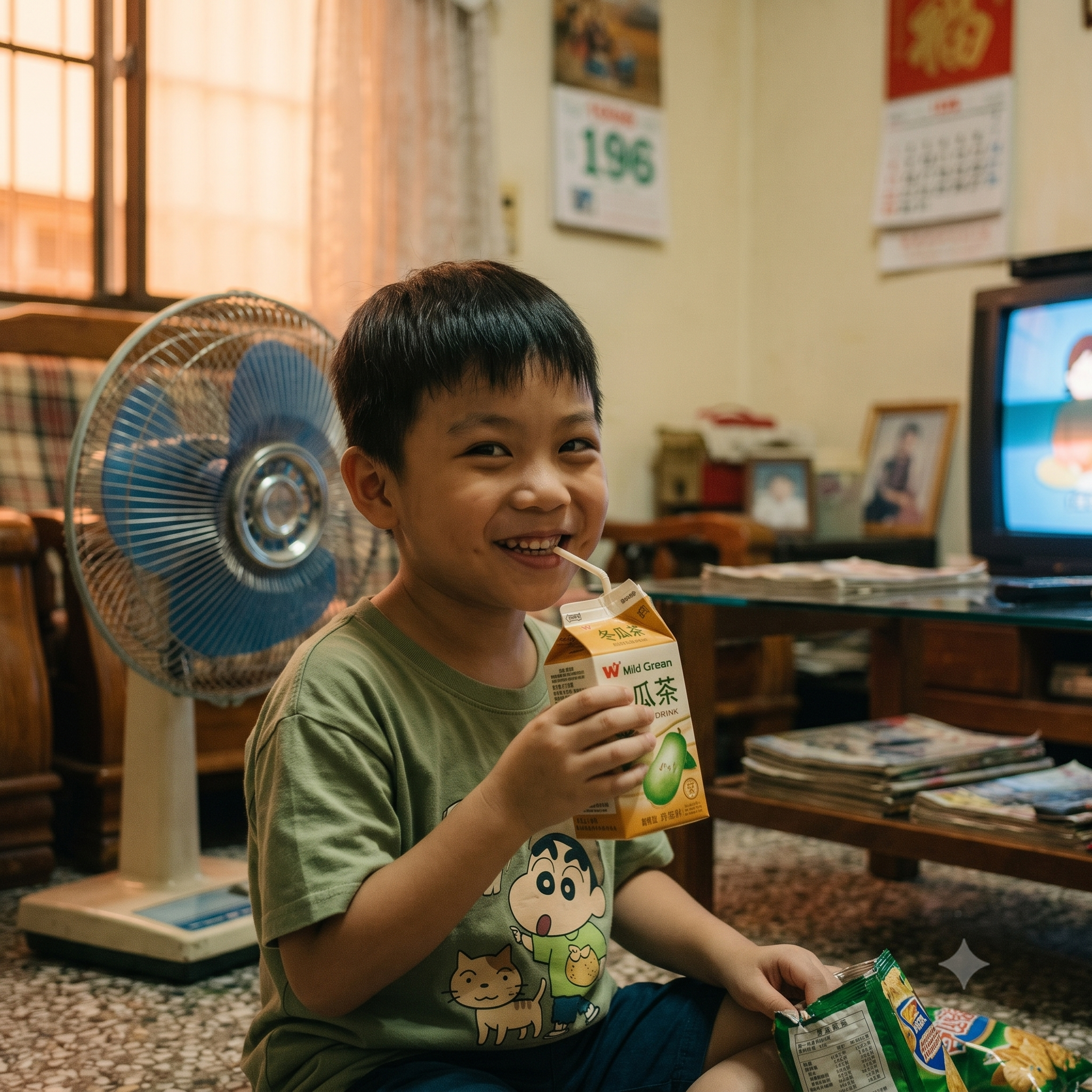
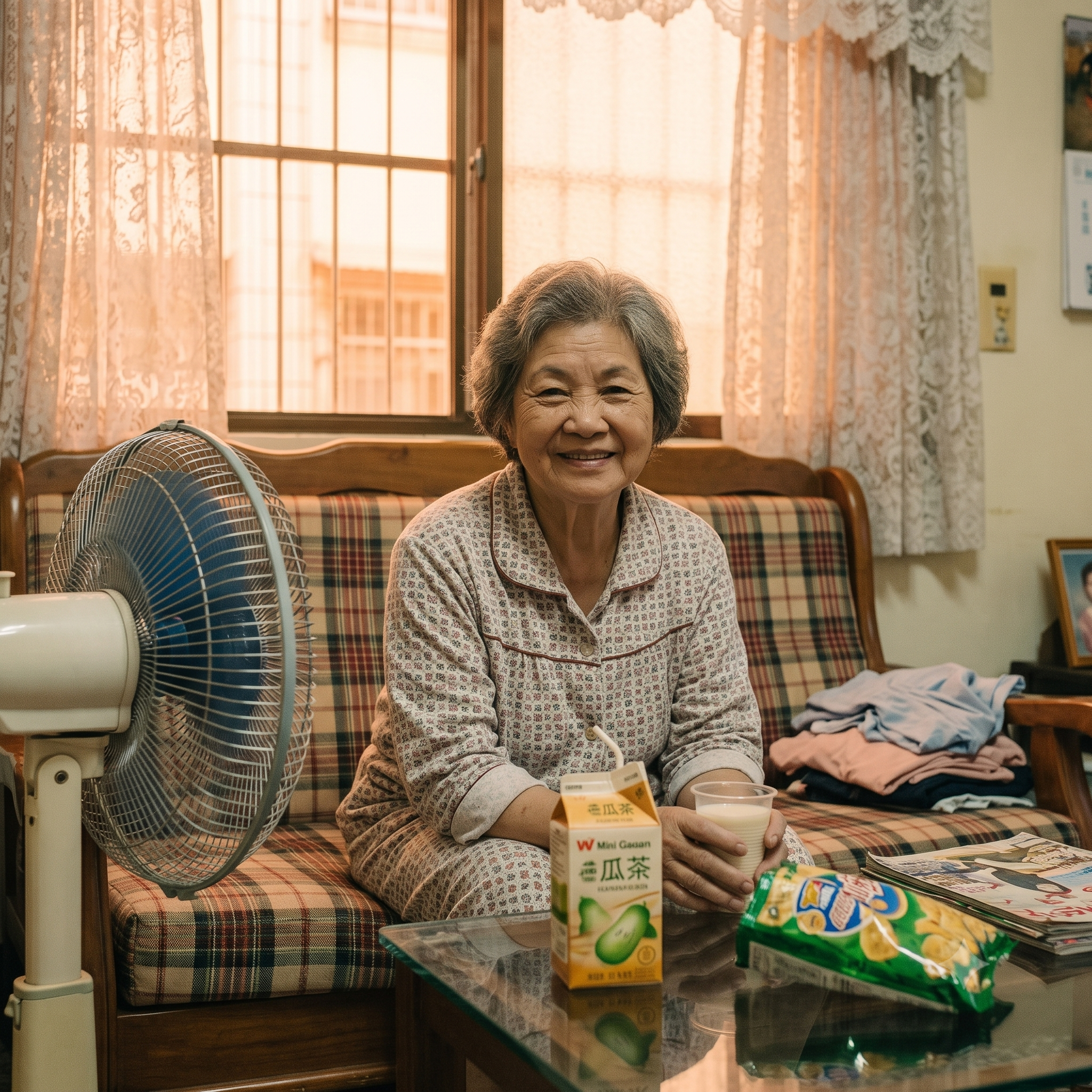
劇本提示詞包含多句中文人物對白:
- 孫子:「哎呀怎麼又壞了啦!」
- 阿嬤:「來,阿嬤看看,這台老電視又在鬧脾氣了喔。」
- 孫子:「哇!阿嬤你好厲害喔,好了耶!」
- 阿嬤:「拿去,快坐好喝冬瓜茶看卡通吧。」
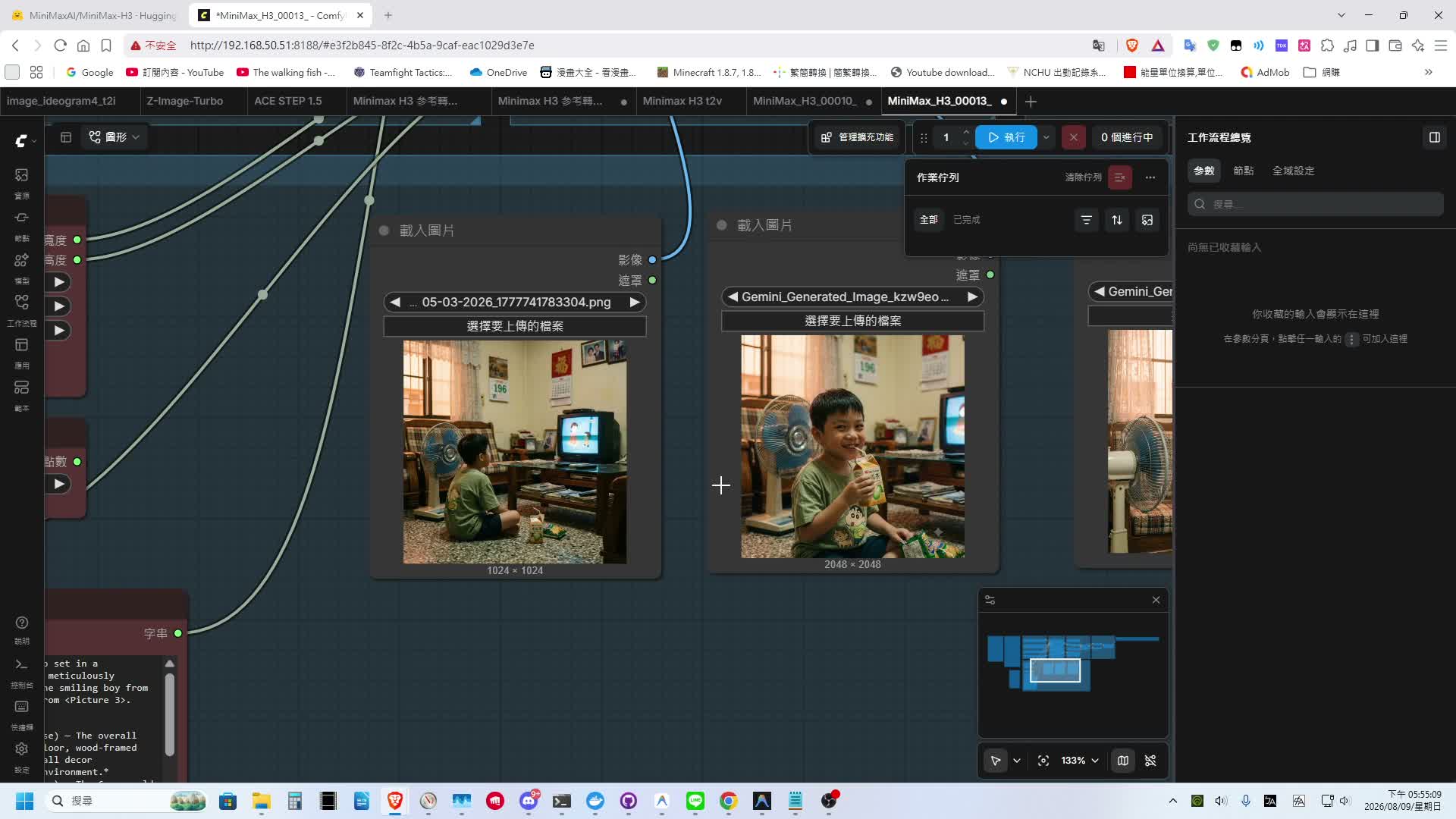
以下為阿嬤修電視短劇的完整影音生成結果:
在較長時長與多人物對話的測試下,阿嬤與孫子的長相臉部還原度均維持得相當良好,且模型對提示詞中分鏡動作與對話劇情的遵從度非常高。
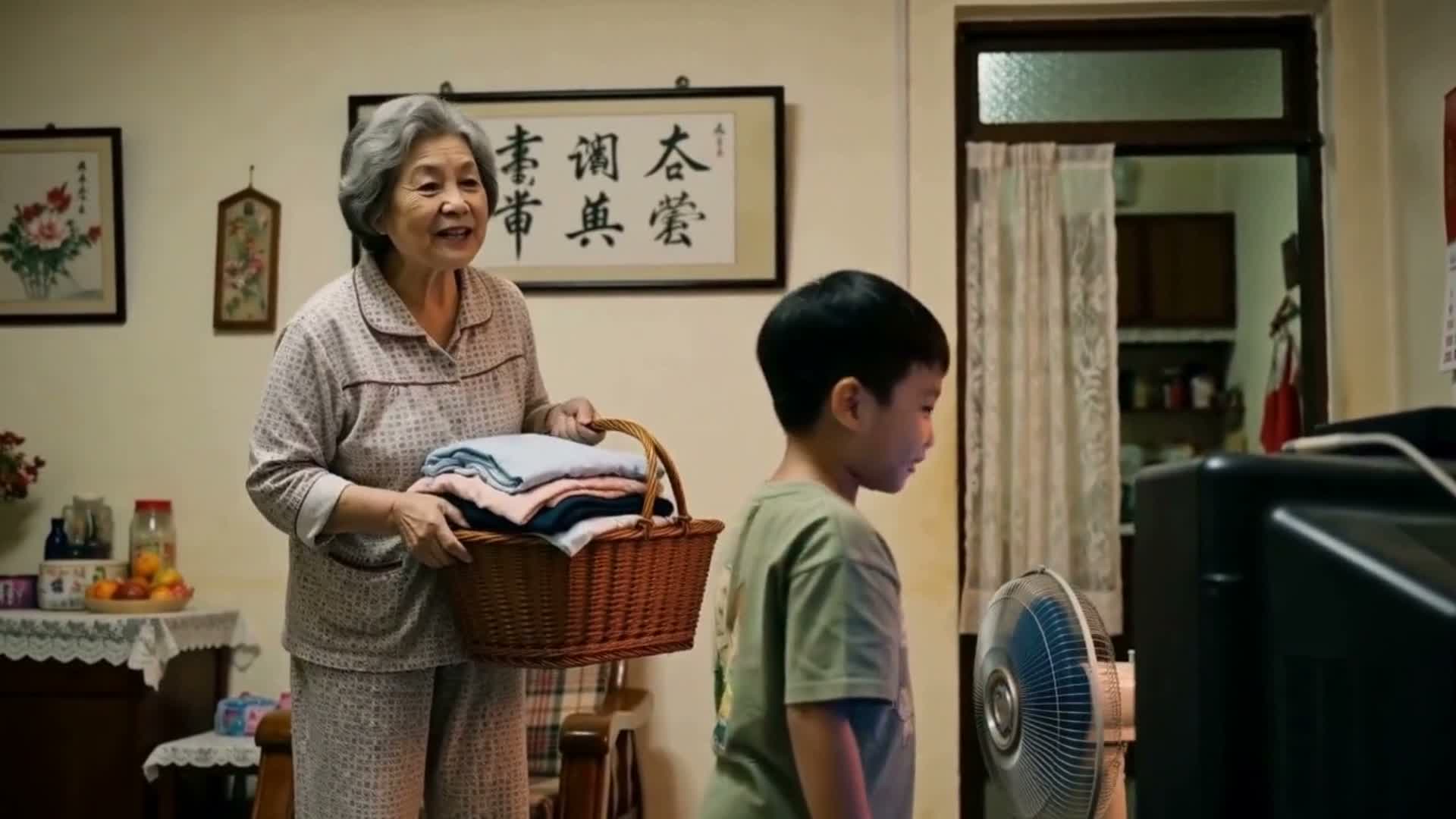
然而,由於該段提示詞包含頻繁的鏡頭視角切換(從孫子抱怨、阿嬤拍電視到遠景全景),細看可以發現畫面中的桌子、椅子、牆面與周遭擺設等場景物件,在不同鏡頭切換間出現了明顯的位置變動與空間位移:
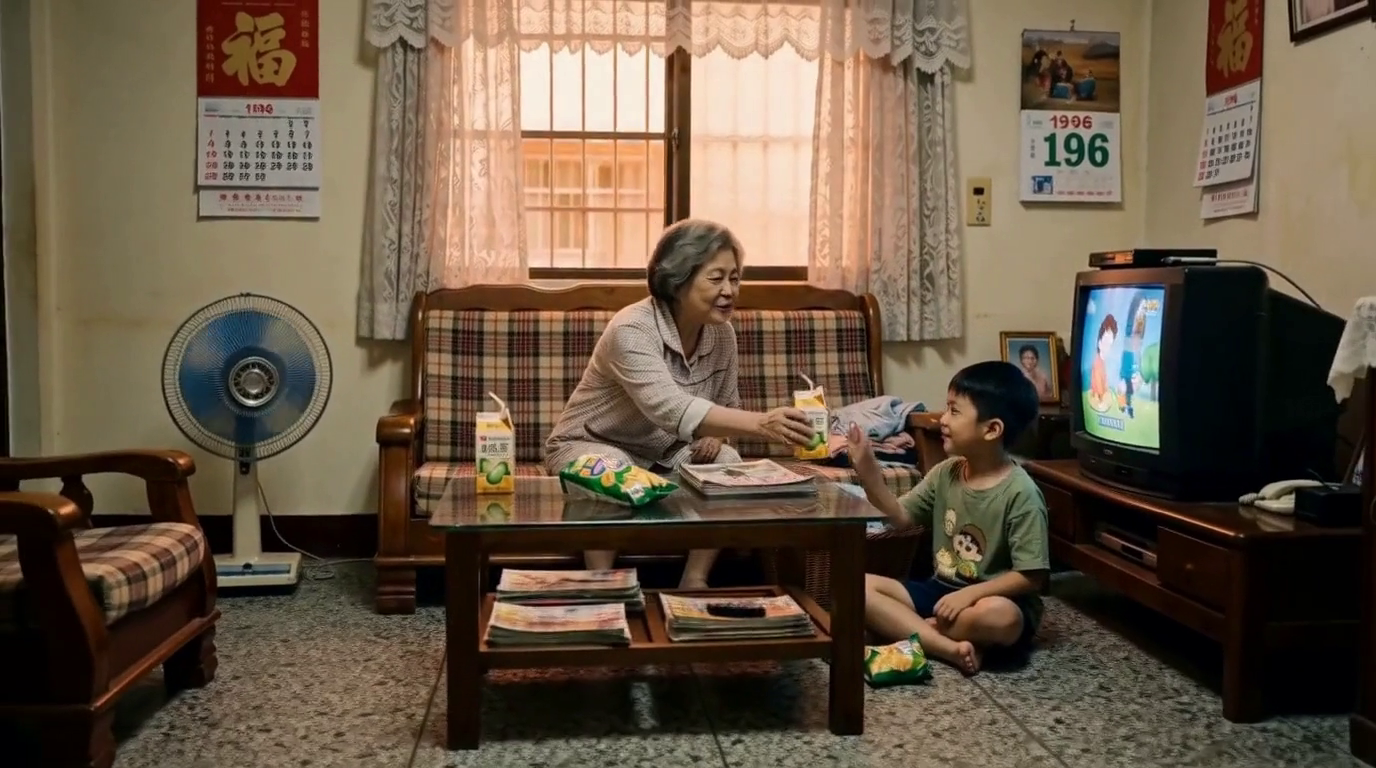
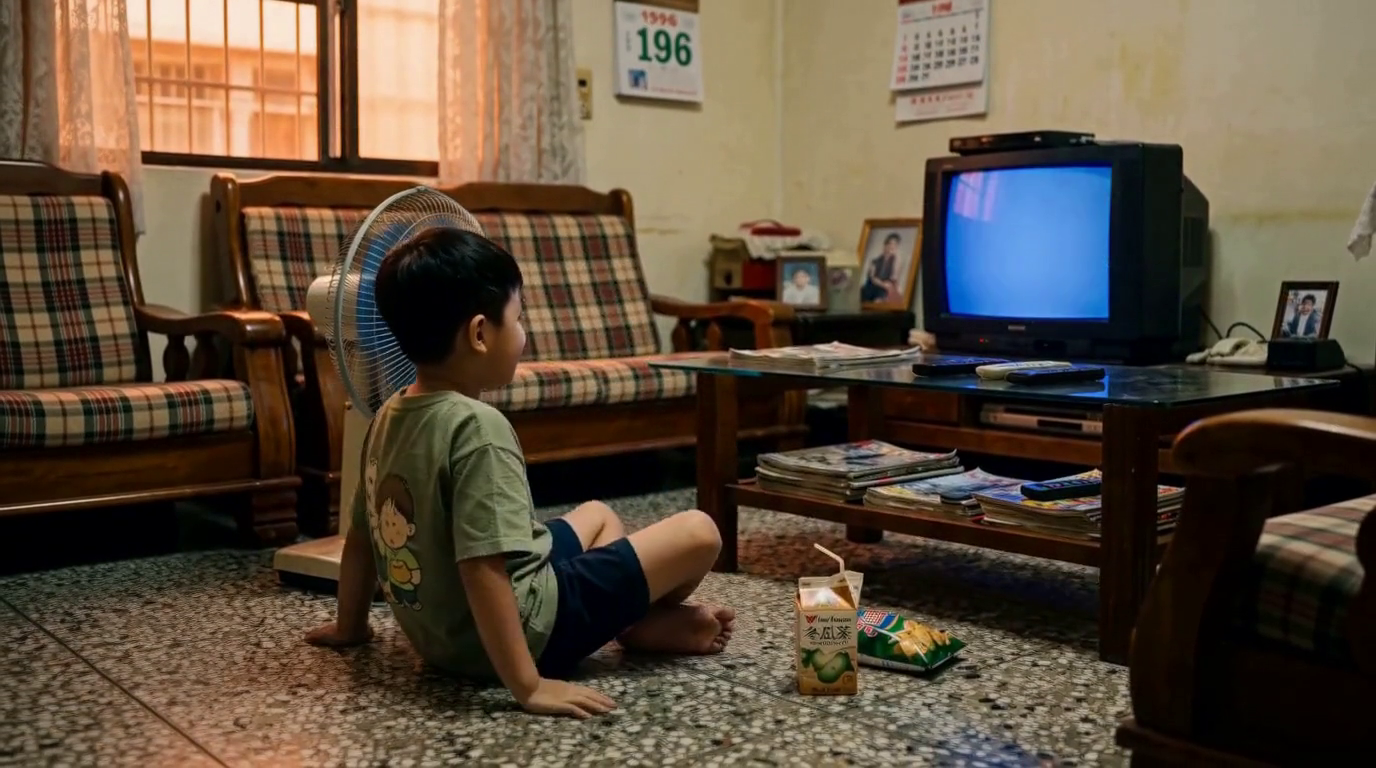
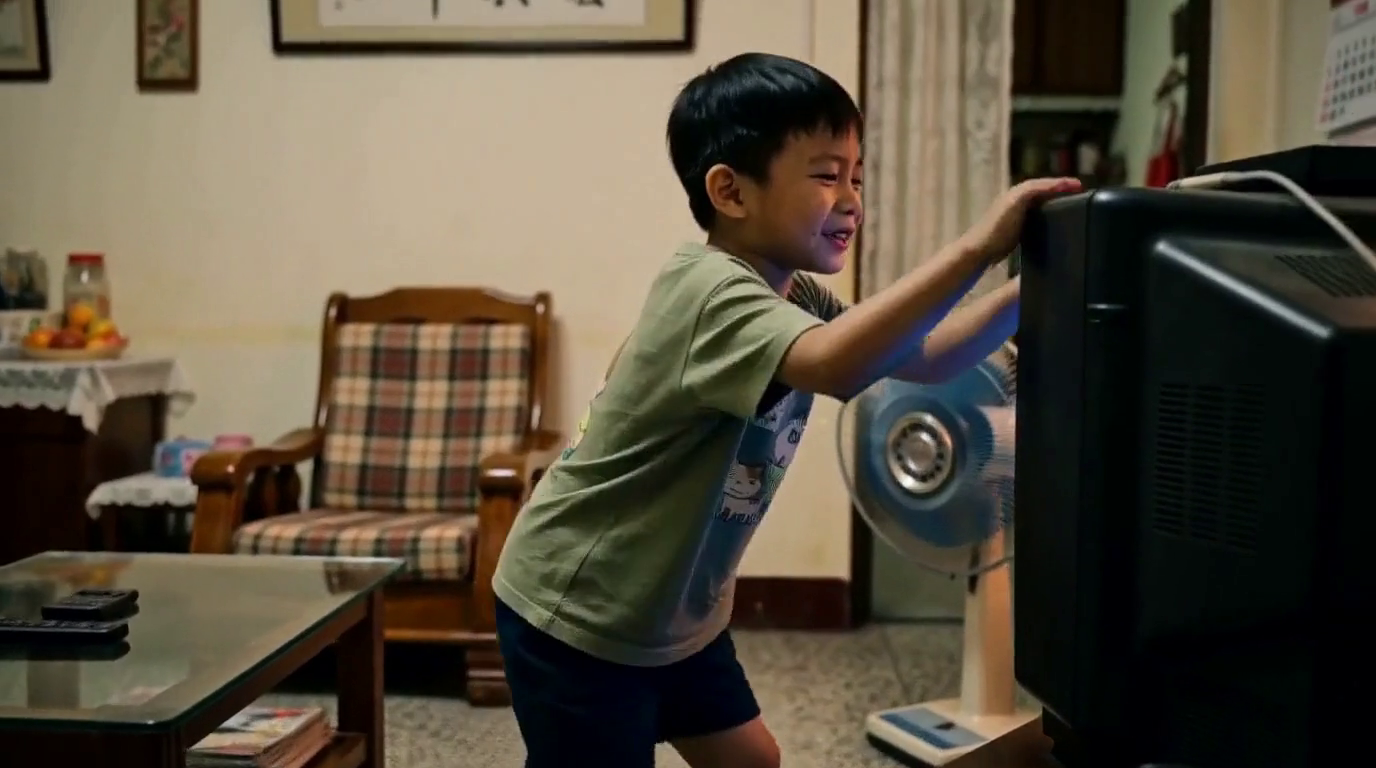
這顯示 MiniMax H3 在處理複雜多鏡頭視角切換時,對背景與場景空間的一致性 (Environment & Spatial Consistency) 仍有持續改善與優化的空間。
提示詞:
 1
 2
 3
 4
 5
 6
 7
 8
 9
10
11
12
13
14
15
16
17
18
19
20
21
22
23
24
25
26
27
28
29
30
31
32
33
34
35
36
37
38
39
40
41
42
43
44
45
|
A nostalgic, cinematic short drama video set in a traditional 1996 Taiwanese living room, meticulously combining the scene from <Picture 1>, the smiling boy from <Picture 2>, and the kind grandmother from <Picture 3>.

[Reference setup]
- <Picture 1>: Original scene setup (Base) — The overall 1990s retro living room with terrazzo floor, wood-framed plaid sofa, electric fan, CRT TV, and wall decor (calendars/photos). *This defines the environment.*
- <Picture 2>: Xiao Ming (Child Character) — The 6-year-old boy in a green graphic T-shirt, seen with a broad, mischievous smile. *This defines the boy's appearance and happy demeanor.*
- <Picture 3>: Ah-Ma (Grandmother Character) — The kind 65-year-old Taiwanese grandmother with gray hair, seen sitting comfortably on the plaid sofa in her home clothes. *This defines the grandmother's appearance and placement.*

[Timeline & Shot Breakdown]

00:00–00:04 (Shot 1: Nostalgic Afternoon & Glitch)
Low-angle medium shot, focusing on the scene from <Picture 1>. The smiling boy (from <Picture 2>) sits cross-legged on the terrazzo floor eating chips and watching cartoons on a CRT TV while the electric fan from <Picture 1> rotates slowly. At 00:02.5, the TV screen suddenly flickers with static noise and cuts to a blue screen. The boy's smile fades into a flustered expression.
- 環境音: Whirring sound of the old electric fan, cartoon dialogue audio from CRT TV speakers.
- 音效: Crisp chip crunching sound, followed by a sharp electronic static noise as the TV turns blue screen.
- 台詞(小明,童音,焦急委屈): 「哎呀!怎麼又壞了啦!」
  → 說話時間:從 00:02.8 開始,於 00:03.9 前說完。
- 配樂: Soft acoustic guitar nostalgic intro melody, suddenly fading out when the static noise hits.

00:04–00:08 (Shot 2: The TV Whisperer)
Medium side-profile shot. Xiao Ming (the boy) gets up, kneels by the TV, and desperately pats the top of the casing. Ah-Ma (the grandmother, as seen in <Picture 3>) walks into the frame holding a basket of laundry, smiling warmly at his frantic reaction.
- 環境音: Faint footsteps on terrazzo floor, rustle of folded clothes in the basket.
- 音效: Soft hollow "thump-thump" sounds as Xiao Ming pats the TV top casing.
- 台詞(阿嬤,台灣腔台語/國語,慈祥笑意): 「來,阿罵看看,這台老電視又在鬧脾氣了喔。」
  → 說話時間:從 00:05.2 開始,於 00:07.5 前說完。
- 配樂: Warm wooden marimba and subtle cello harmonies gently entering, creating a reassuring atmosphere.

00:08–00:11 (Shot 3: Ah-Ma's Magic Tap)
Close-up shot. Ah-Ma sets down her basket, leans over, and gives the side of the CRT TV two firm, experienced slaps. The blue screen flashes and instantly restores the bright, colorful cartoon animation. Xiao Ming (the boy) jumps up cheering in pure excitement, returning to his happy demeanor from <Picture 2>.
- 環境音: Happy cartoon soundtrack resuming from TV speakers.
- 音效: Two solid "clack-clack" TV slap sounds, followed by a bright CRT power-up hum.
- 台詞(小明,興奮童音): 「哇!阿罵你好厲害喔!好了欸!」
  → 說話時間:從 00:09.2 開始,於 00:10.8 前說完。
- 配樂: Cheerful acoustic piano chord chiming in, elevating the joyful mood.

00:11–00:15 (Shot 4: Winter Melon Tea & Warm Memory)
Slow dolly-out wide hero shot. Xiao Ming (the boy) sits back down on the floor. Ah-Ma (the grandmother) is now sitting comfortably in her designated spot on the wood-framed plaid sofa behind him (as pictured in <Picture 3>), handing him a fresh tetra-pak winter melon tea. Xiao Ming takes a sip through the straw with a bright, satisfied, and mischievous smile under the warm afternoon sunlight filtering through lace curtains.
- 環境音: Gentle straw sipping sound, fan spinning softly in the background.
- 音效: Satisfying drink carton straw insert "pop" sound.
- 台詞(阿嬤,溫柔親切、帶著滿滿疼愛): 「拿去,快坐好喝冬瓜茶看卡通吧。」
  → 說話時間:從 00:11.2 開始,於 00:13.2 前說完,最後 1.8 秒完全留白給畫面與配樂結尾.
- 配樂: Full acoustic guitar and piano harmony resolving into a sweet, nostalgic final chord landing gracefully at 00:15.

[Global sound notes]
- The video audio is generated in native synchronized stereo; background music automatically ducks by ~30% during character dialogue to keep voices distinct and intimate.
- Dialogue features authentic 1990s Taiwanese family cadence (natural Mandarin with slight Taiwanese accent for Ah-Ma, genuine child voice actor tone for Xiao Ming).
- Maintains film grain, warm afternoon sunlight, 1996 wall calendars, and nostalgic Taiwanese home interior color grading (as defined by <Picture 1>) across all 15 seconds, ensuring the boy's identity from <Picture 2> and the grandmother's identity from <Picture 3> are perfectly integrated.
|
ComfyUI 本機部署與模型選擇
看完生成效果後,接下來介紹如何在 ComfyUI 中部署並使用 MiniMax H3。
1. ComfyUI 環境準備 (Windows)
對於 Windows 作業系統使用者,建議直接前往 ComfyUI 官方 GitHub Releases 頁面下載 Portable 一鍵包:
- 下載並解壓縮 Portable 壓縮包。
- 進入
update 資料夾,點擊執行 update_comfyui_stable.bat 確保核心與套件更新至最新版本。
- 返回主目錄,點擊
run_nvidia_gpu.bat 即可啟動 ComfyUI Web UI。
2. 工作流範本載入
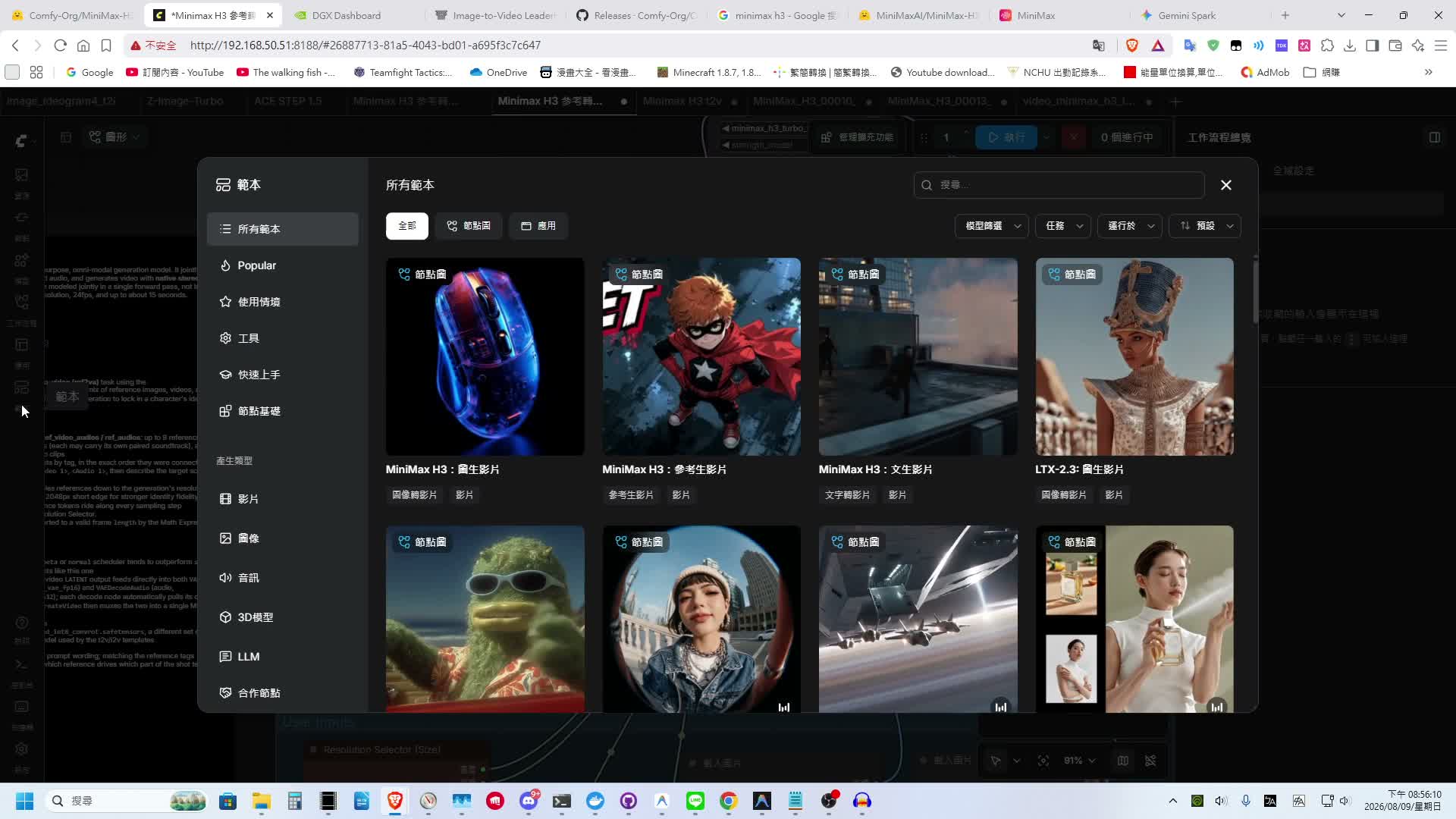
在最新版本的 ComfyUI 中,側邊欄的 Templates(範本) 區塊已經直接內建了 MiniMax H3 的官方工作流,包含:
- Text-to-Video (文生影片)
- Image-to-Video (圖生影片)
- Reference-to-Video (參考生影片)
點擊對應範本後,介面會自動載入所需的節點構建,並標明相應需要下載的模型權重檔。
3. Hugging Face 模型下載建議
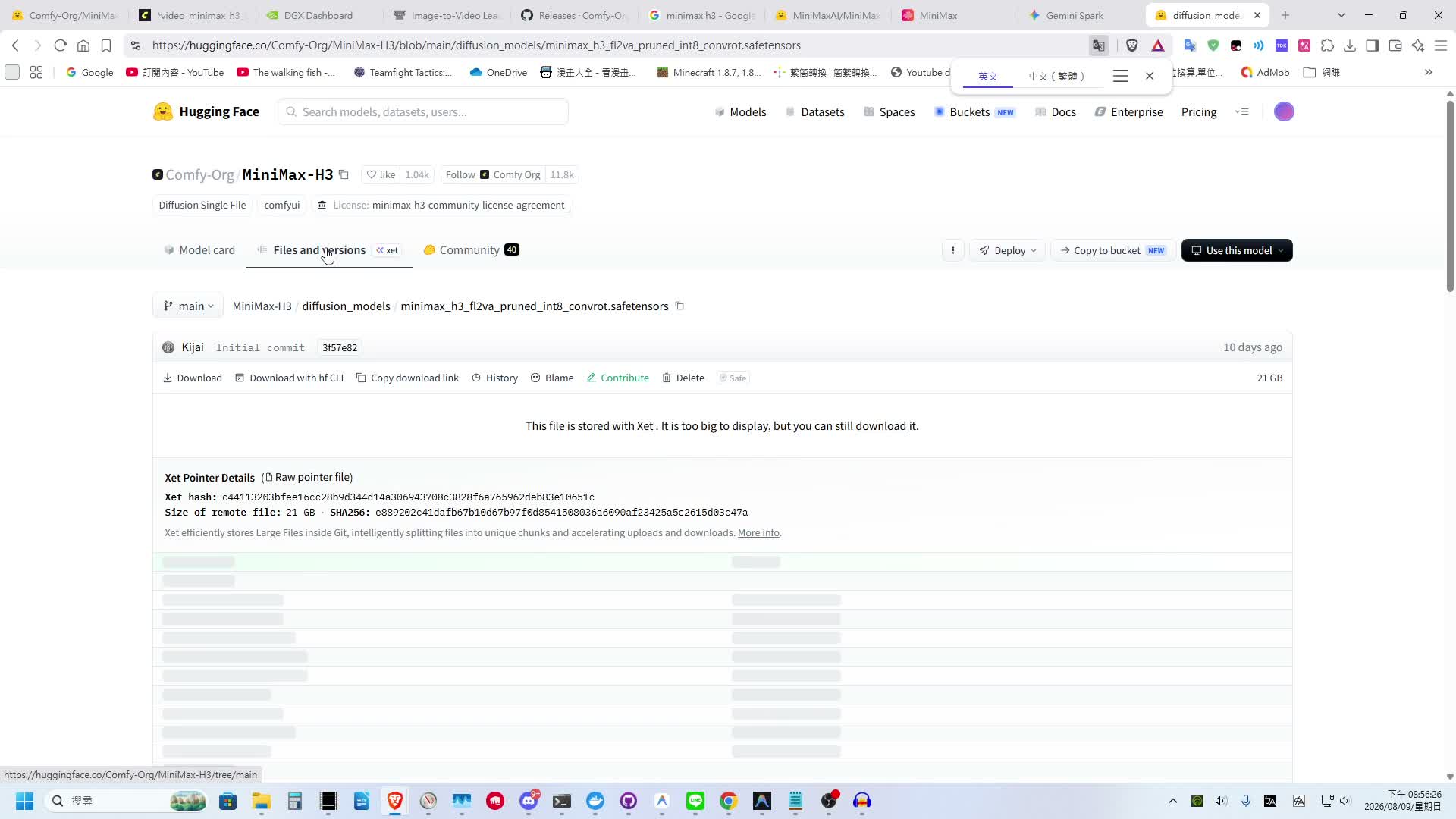
在 Hugging Face 下載模型時,考慮到顯示卡記憶體開銷,推薦下載 int8 或 FP8 量化版本。
此外,請特別注意選擇檔名帶有 pruned 後綴的版本(例如 pruned 模型體積較小,並且已剪枝掉模型訓練時使用、但推理運算時不需要的冗餘權重),能在不影響生成品質的前提下大幅節省下載時間與磁碟空間。
性能耗時實測與 Turbo LoRA 速度優化
影片生成的計算量極大,實際運作所需的生成時間是許多玩家關心的重點。
1. 耗時基準測試 (Benchmark)
本次測試硬體為 ASUS Ascent GX10(NVIDIA DGX Spark 平台,配備 128GB LPDDR5x 統一記憶體,GPU 算力規模約相當於桌面型 RTX 5070):
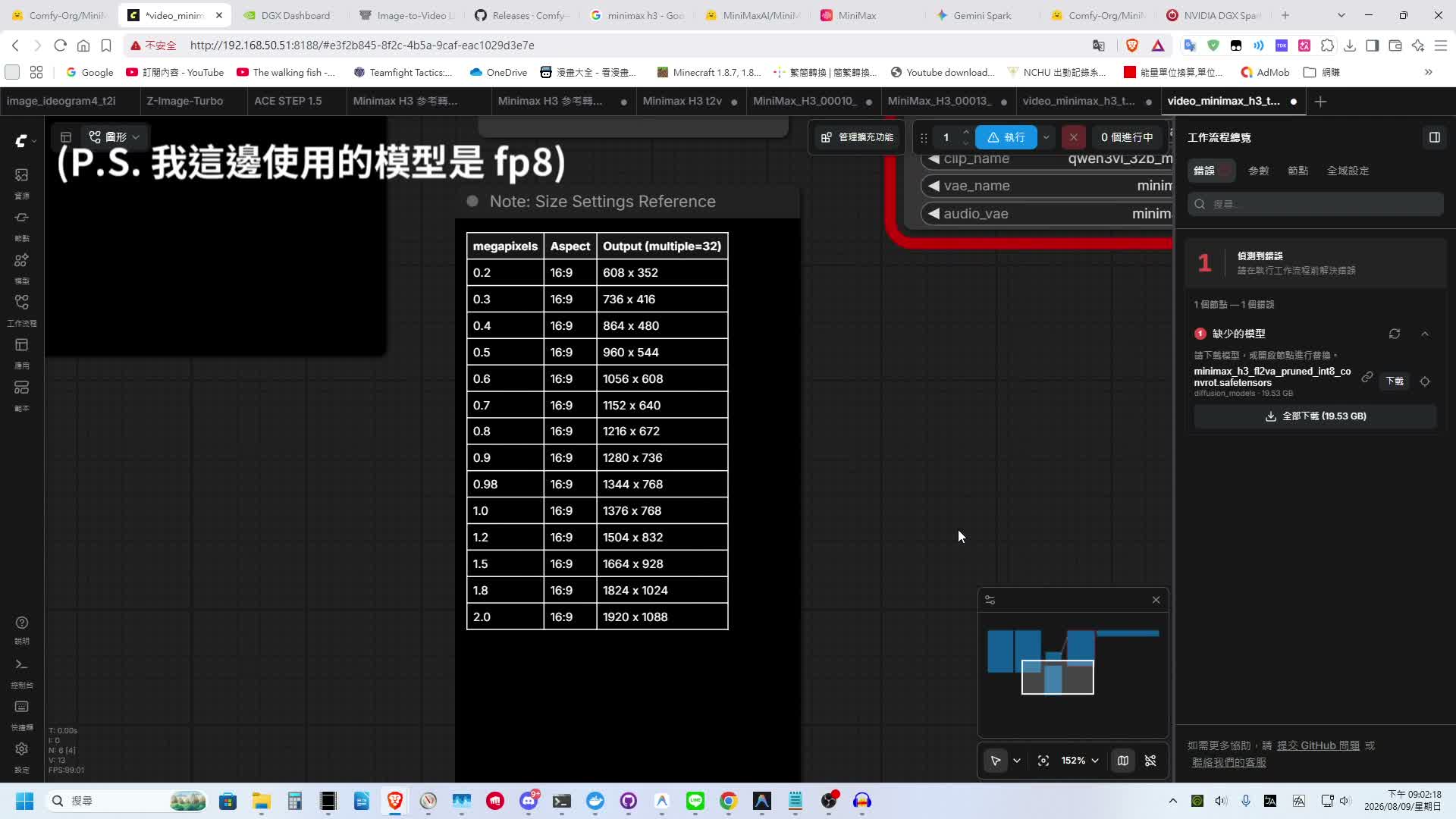
根據 ComfyUI 官方提供的對照表與實測結果:
- 低解析度模式(0.6 MP /
1056x608,生成 6 秒影片):耗時約 800 秒(約 13.3 分鐘)。
- 高解析度極限模式(2.0 MP /
1920x1088,生成 15 秒影片):耗時高達 1 小時 20 分鐘(80 分鐘)。
對於個人創作者或顯示卡效能有限的使用者來說,單張影片耗時超過一小時顯然難以忍受。
2. 使用 MiniMax H3 Turbo LoRA 加速
為了提昇生成效率,社群開發了專用蒸餾加速模型——MiniMax H3 Turbo LoRA,能大幅減少擴散步數 (Inference Steps):
- 僅生成純視覺影像:極速模式下僅需 4 步 (Steps) 即可完成生成。
- 包含聲音與對白生成:若只設定 4 步,生成出來的音訊極易發生破音與聲音破碎情況。若需要完整清晰的音訊,請按照以下參數設置:
- Steps (採樣步數):設定為 8 步
- KSampler Sampler:選擇
Euler
- Scheduler:選擇
beta
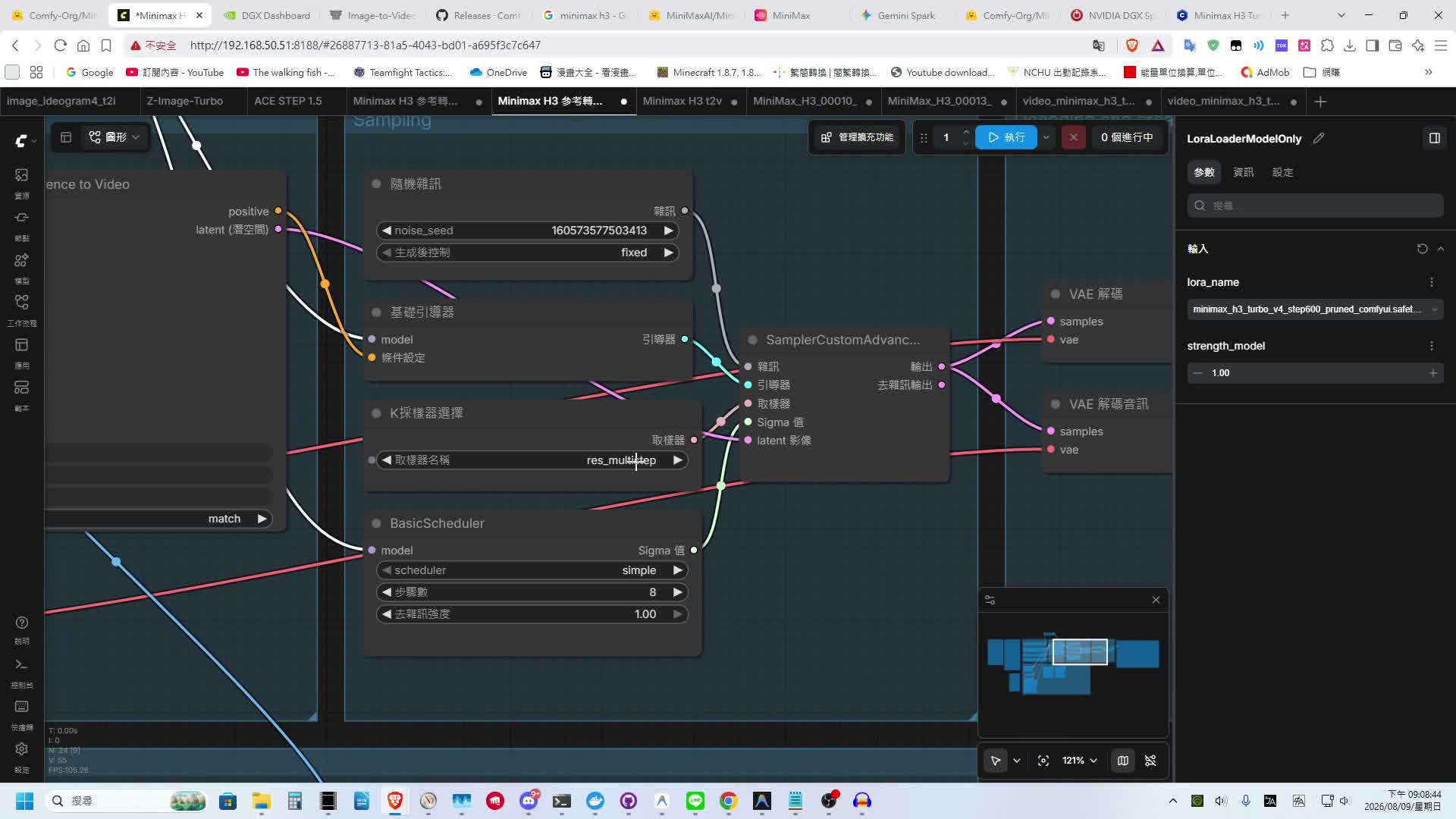
採用此設定後,語音聽起來雖然仍有些許壓縮感,但能確保對白清晰可辨且完全不會破碎。
以下為使用 MiniMax H3 Turbo LoRA 生成的古風武俠風格短劇畫面:
在僅需 8 步的運算時間下,人物眼神細節與對白口型依然維持了極高品質,大幅提升了實用價值。
總結
MiniMax H3 的開源展現了開源 AI 影片生成領域的巨大進步,特別是在「影音一體直出」與對中文自然對白語言的強大理解能力上,為影片創作者帶來了全新的可能性。
關於目前熱門的 GGUF 量化格式,理論上若使用 GGUF 格式,在 12GB VRAM 的主流顯卡(如 RTX 4070 / RTX 3060 12G)上應可勉強推動運算。對開源 AI 影片生成有興趣的朋友,不妨自行下載測試體驗看看!